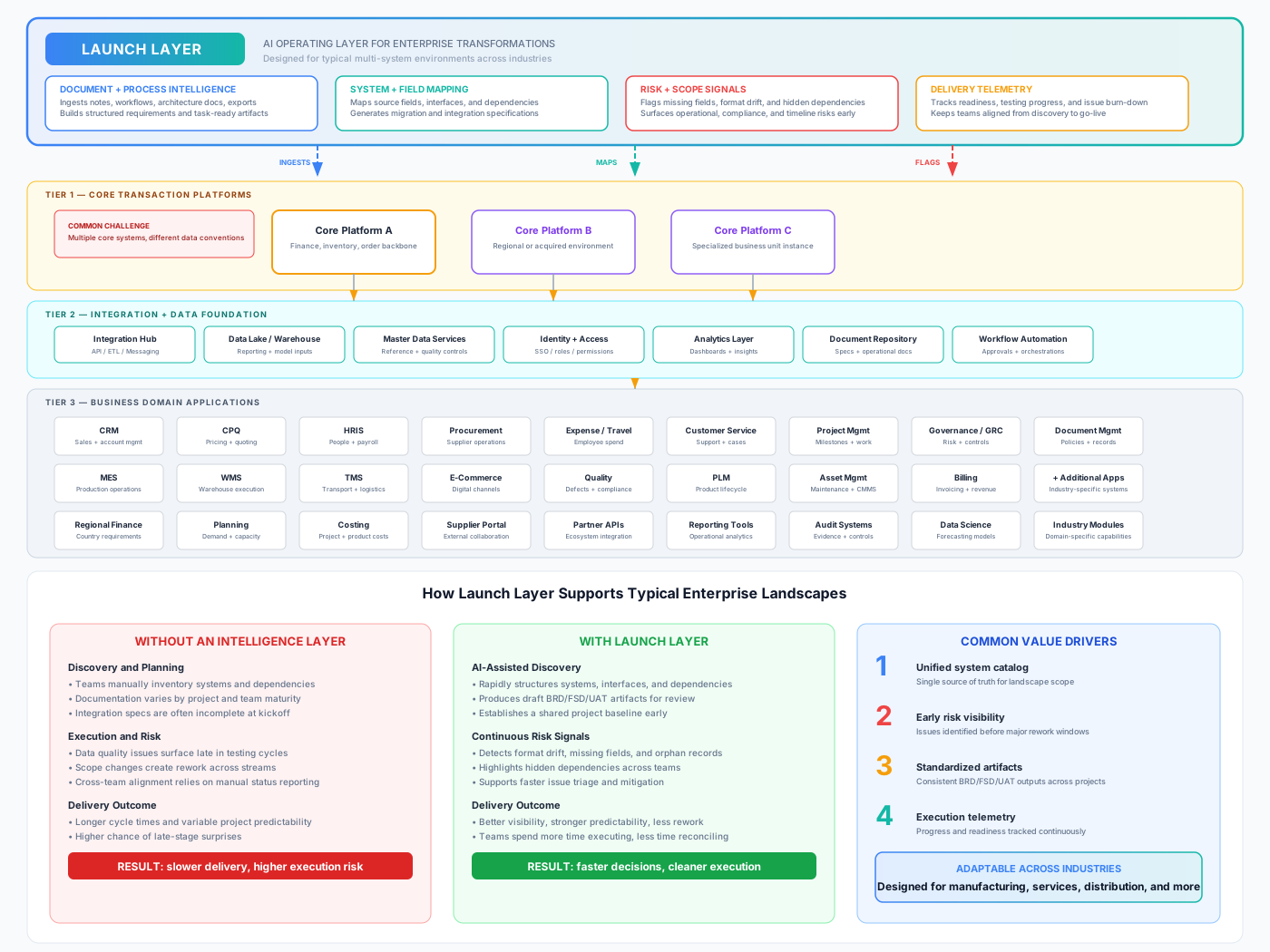
Launch Layer doesn't replace any system in your stack. It reads your entire application landscape, maps every integration, flags risks before they become surprises, and auto-generates the documentation your transformation needs.
Whether you're migrating 5 systems or 50, the same automation applies. Upload your first document and get structured output in minutes.
Try the Demo See the ArchitectureFour steps from raw documentation to transformation-ready artifacts.
Upload meeting transcripts, process docs, architecture diagrams, data exports, and legacy system documentation. Any format.
AI identifies every system, every integration point, and every field-level connection. Builds a living catalog of your landscape automatically.
Auto-produces BRDs, functional specs, integration mappings, and UAT test scripts. Ready for human review, not a blank page.
Tracks transformation progress in real time. Flags scope changes, data quality issues, and go-live readiness as the project evolves.
This is a real enterprise landscape: 40+ systems, 4 ERP instances, 6 middleware layers, 5 geographic regions. Launch Layer sits above all of it as an intelligence layer.
Reads documentation, data exports, and API specs from core ERPs, middleware, and every connected business application. Nothing is out of scope.
Auto-generates field-level integration maps. Identifies format mismatches, data model differences, and transformation rules needed for migration.
Detects multi-ERP fragmentation, non-standard data formats, missing fields, and compliance-critical systems that haven't been addressed.
Each module works independently or together. Start with what you need.
Ingests raw workshop transcripts, process maps, legacy documentation, and BRDs. Extracts structured requirements and produces deployment-ready artifacts automatically.
Auto-maps field-level connections between source and target systems. Identifies format mismatches, data type conflicts, and generates transformation rules.
Salesforce.Account.BillingAddress → SAP.BP.ADDR1_DATA
Including currency conversion rules for LATAM accounts and date format transformations per region.
Scans legacy data exports and architecture documentation to find issues before they become expensive surprises. Monitors scope continuously throughout the project.
Real-time dashboard tracking transformation progress across every system and integration. Surfaces go-live readiness, test coverage gaps, and scope changes as they happen.
Not dashboards for the sake of dashboards. These are the artifacts your project actually needs.
Auto-generated BRDs from ingested meeting notes and process documentation. One per system or integration.
Field-level FSDs with data types, transformation rules, and validation logic for every mapped connection.
Generated from requirements and mappings. Each script validates a specific data flow end-to-end.
Field-level mapping specs between source and target systems with format conversion rules flagged.
Data quality issues, format conflicts, missing fields, and compliance gaps — surfaced on Day 1, not Month 8.
Living inventory of every system, its criticality rating, integration dependencies, and migration status.
Scans exports for duplicate records, inconsistent formats, orphaned references, and missing required fields.
Real-time telemetry on migration progress, test coverage, scope changes, and go-live readiness.
Here's what a typical mid-market manufacturer's application landscape looks like. Launch Layer catalogs and maps every system in it.
Your landscape might be simpler — that's fine. A company with 5 systems and 1 ERP gets the same automated mapping, risk detection, and document generation. Launch Layer scales to the complexity you have, not the complexity you don't.
Three connected loops make this more than a generic AI feature: trusted delivery workflow, learning moat, and measurable project economics.
Speed from AI draft, trust from human approval, and better output every cycle.
ERP-specific rules and project feedback compound into a proprietary execution graph competitors cannot clone overnight.
The model is simple: compress discovery, catch risk earlier, and improve SI margin per project.
Side-by-side outcomes from ERP transformation projects of comparable complexity.
Upload a single document — a meeting transcript, a process diagram, a data export — and see what Launch Layer finds. No setup required.
Try the Interactive Demo